Technique Tuesday – Reverse Watercoloring!!!

Posted on

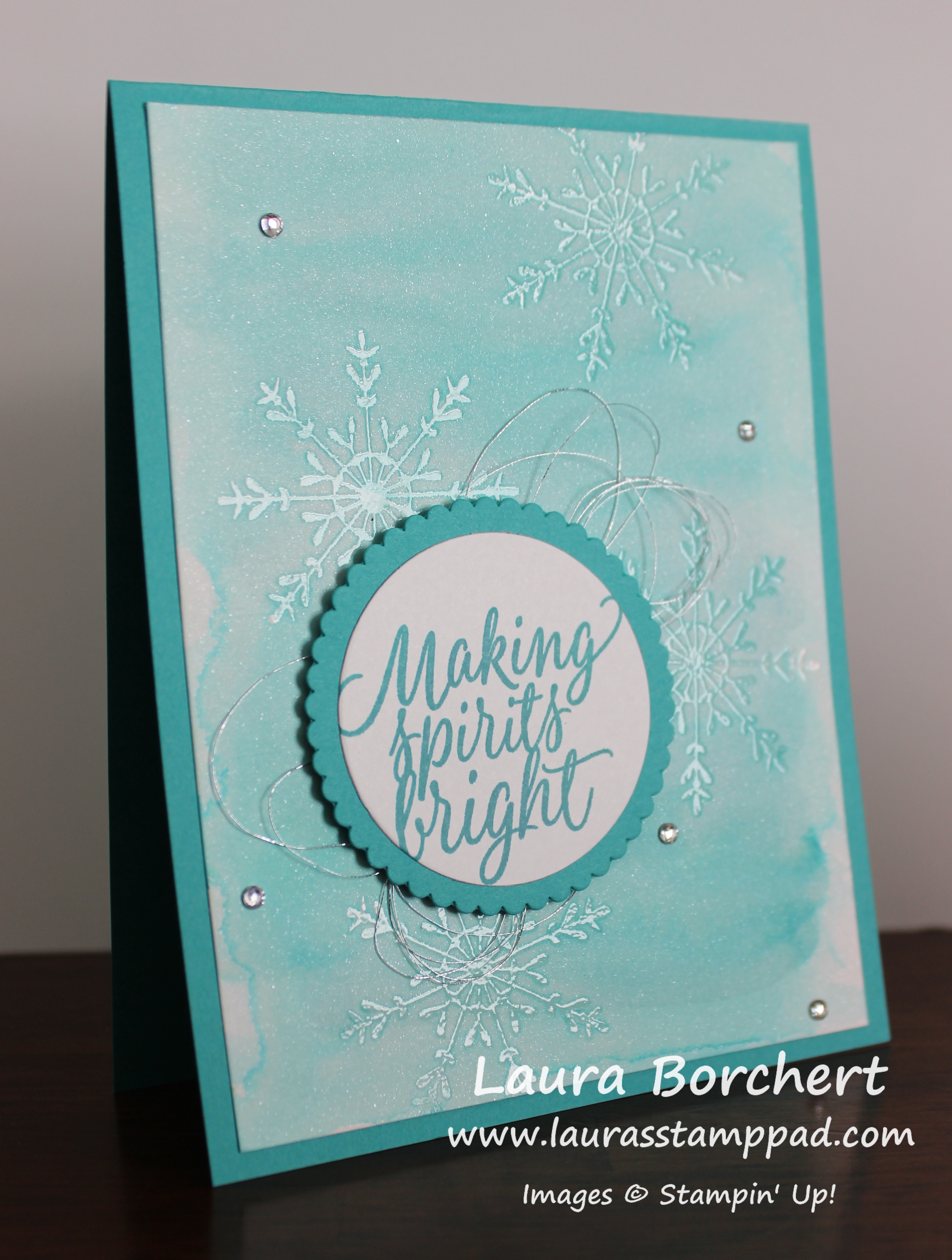
Happy Tuesday everyone!!! I hope you have survived the fabulous turkey feast and shopping craziness! Now it is back to the craft room to prepare for the next holiday!!! This technique is super fabulous for Christmas Cards and cards all year long!!!

Watercolor Lifting, www.LaurasStampPad.com

I just love the shades of blue this card has and, without the snowflakes, I can dream of blue water and white sand on the beach! I said I can dream…..I know that doesn’t exist in Illinois especially this time of the year!!! Let’s get started on this amazing technique!

SUPPLIES NEEDED: Shimmery White Cardstock, Aqua Painter, Clear Embossing Powder, Heat Tool, VersaMark, Stamp Set of your choice and embellishments

I started with a Bermuda Bay card base. Then I took a piece of Shimmery White Cardstock (4″ x 5-1/4″) and went over the entire piece with the Aqua Painter to wet it down a little. This will help the color bleed and sort of prime the paper. You don’t need to soak it but just a little brush of water over the top. Now pick up some Bermuda Bay Ink and watercolor wash over the paper. You can go to the edge or leave a border. That is all up to you! Now allow this to dry by setting it aside or using the Heat Tool!

Side Notes while it dries……I use Shimmery White cardstock because of the fabulous shimmery look but also because it is a little bit thicker than Whisper White but not as thick and textured as Watercolor Paper. Watercolor Paper has too much texture so it won’t get a nice stamped image for clear embossing. Also, when you are using the Aqua Painter, you can either press your ink pad into the lid and use that as your color palette or you can press a clear block into the pad and use that. I prefer using the clear block because it isn’t as messy and I can easily clean it up. You could also drop re-inker onto the clear block and do it that way as well!

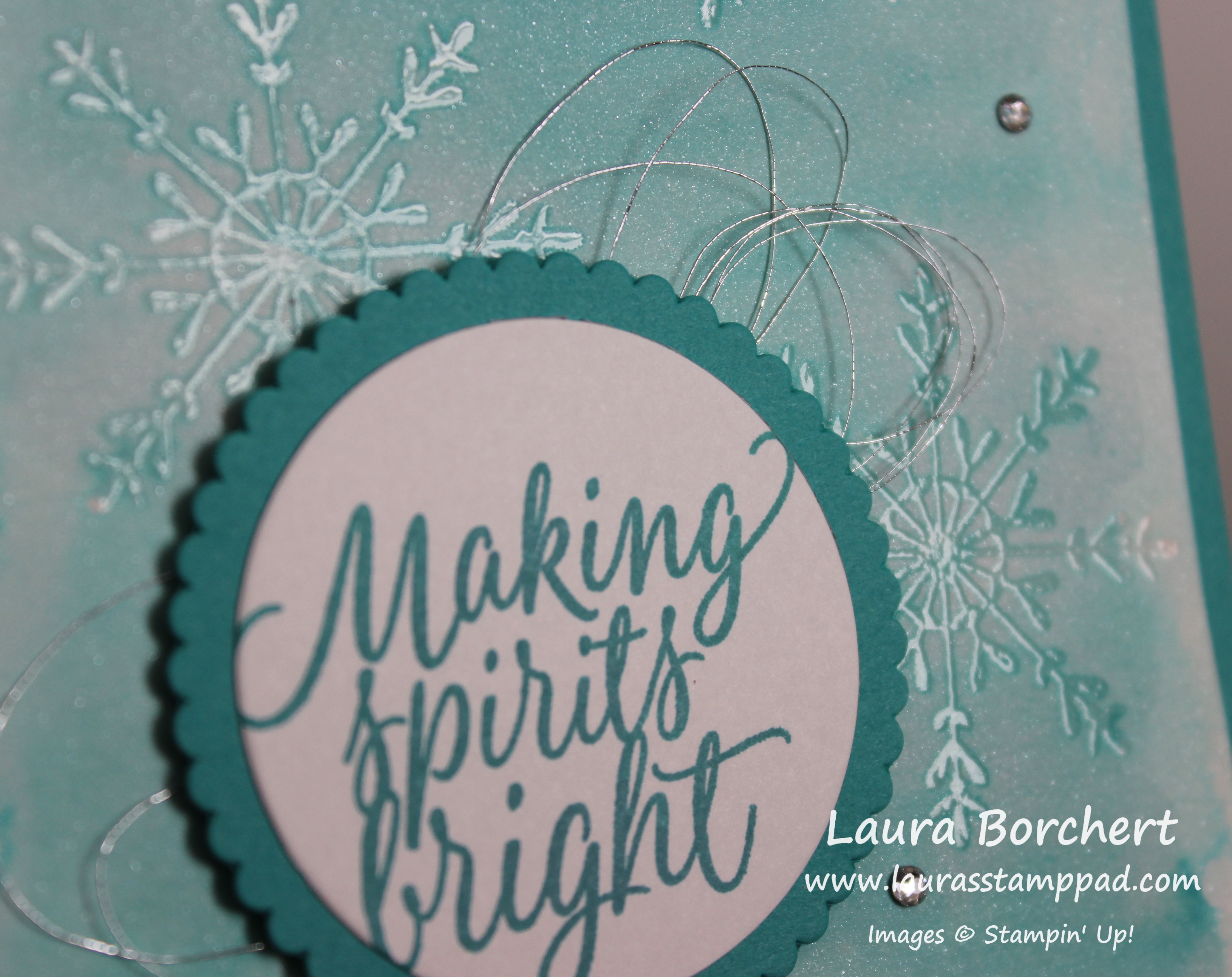
Once it is dry, you will stamp all over in a solid image stamp set with VersaMark Ink. I used the snowflake from the Tin of Tags Stamp Set. Apply Clear Embossing Powder over the top and set it with the Heat Tool. You can see a tutorial on Heat Embossing here. Now that your embossed image are set, they will hold the color underneath. Using your Aqua Painter, you will gently brush over the entire cardstock like you did in the beginning but this time with no color on your brush. You are just adding water which is lightening the watercolor wash that you applied earlier. The color is still being held under the images so they are popping more now. That is the Reverse Watercolor Technique!!!

Snowflake Tin of Tags, www.LaurasStampPad.com

Once your watercolor is dry, you can add it to your card base. I used Fast Fuse for a strong hold since the cardstock is warped a little. For the greeting, I used the Tin of Tags Stamp Set and stamped onto Whisper White. Using the Layering Circle Framelits, I die cut the greeting as well as a scallop in Bermuda Bay. I adhered these together and added loops of Metallic Silver Thread to the back and then placed it on the card front. For the Metallic loops, just wrap it around your finger as many times as you wish (8-12 times). Then twist the loops in the middle to create a figure 8 and place it on the back of the greeting. Using Stampin’ Dimensionals to secure it to the back of the greeting and then add it to the card front! I still thought it needed a little bit more bling so I added some Rhinestones all over! Love it!!!

Be sure to check back tomorrow as I will be sharing another sample using this technique! Tomorrow’s sample is a card for any time of the year!

If you would like to see this in action, check out the Video Tutorial below or click here. Don’t forget to give it a thumbs up if you liked it and be sure to subscribe if you are new!!

Happy Stampin’

~Laura


Technique Tuesday – Santa’s Reindeer!!!

Posted on

Happy Tuesday!!! Are you ready for this amazing masterpiece??? I have to say this is probably THE MOST amazing, detailed, stunning card I have ever made in my 12+ years of stamping. Check it out!!!

Double Z Fold Sleigh, www.LaurasStampPad.com

There are just no words for this card. I honestly don’t think I am going to send it out. I’m going to save it and display it every year ever so proudly. I just love it so much!!! Now let’s get started on how to make it with the Santa’s Sleigh Bundle (Save 10%)!!!

I started with a Night of Navy card base measuring 11″ x 4-1/4″ and a strip of Whisper White measuring 11″ x 1″. Both of these are scored at 2-3/4″ and 5-1/2″ which creates the Z folds! For the panels, I cut Soft Sky cardstock into the following measurements – 4″ x 5-1/4″ and two pieces of 4″ x 2-1/2″. Then I cut Whisper White to layer on top measuring 3-3/4″ x 5″ and two pieces of 3-3/4″ x 2-1/4″. Go ahead and layer the white onto the Soft Sky and then onto the card base. You can stamp the greeting in the upper right corner. I used the one from the Santa’s Sleigh Stamp Set!

Reindeer Sleigh, www.LaurasStampPad.com

Now you can add the Whisper White strip to the bottom of the card. I lined it up with the bottom of the white on the panels. Be sure that you are only adding adhesive to the small flap and half of the long flap. I like to fold it all up and then add the adhesive to the spots showing (see video below). Place it on the card and then you can work on all of the decorations. I added the trees first. I stamped 2 blue trees using the Santa’s Sleigh Stamp Set and die cut them out with the Santa’s Sleigh Framelits (Bundle & Save 10%). I also cut out a tree in Silver Foil Paper! I added two trees to the large panel and one to the middle small panel. Next up are the reindeer. I stamped all of them in Chocolate Chip Ink onto Crumb Cake cardstock. You will need 6 reindeer. I die cut them out. I also die cut the sleigh in Night of Navy, the sleigh overlay in Silver Glimmer Paper, 12 stars in Silver Glimmer Paper (one for each reindeer and a few others to decorate, and a few bows for the presents in Silver Glimmer Paper!

Santa's Reindeer, www.LaurasStampPad.com

Now to assemble the second Z with the Whisper White strip! All you need to do is take a strip of white scored cardstock and add it to your card opposite folds as the base. Fold it like a Z and the long panel will go across the front (sticking to the left side) and the short panel will adhere to the back right hand side. I used Fast Fuse Adhesive for a strong hold and placed it on the bottom lined up with the bottom of the white panel. I added 2 reindeer to each of the little panels of the white Z fold overlapping them just a little. Be sure that when you add adhesive to the reindeer that you are only adding it on the legs so that adhesive isn’t showing and then glues your card together.

Presents in the Sleigh, www.LaurasStampPad.com

Before placing the last reindeer on, I added the sleigh to the card. I placed the Silver Glimmer overlap onto the navy sleigh with Fine Tip Glue Pen and then added it to the far left of the card. I did trim off a little bit of the sleigh on the bottom rung. Once the sleigh is in place, you can add that final reindeer. Now is also when you will add all of your presents. I stamped the 3 different styles of presents from the Santa’s Sleigh Stamp Set onto Night of Navy and Soft Sky cardstock and cut them out. They are super easy to cut since they are rectangles! Place as many presents as you wish in the sleigh. Then I added the ribbons and all of the Silver Glimmer stars to the card with the Fine Tip Glue Pen. For the reins, I added some of the glue from the Fine Tip Glue Pen to the first reindeer, placed the Whisper White Baker’s Twine down and then added a star. Press and hold for a few seconds and then move to the next one. You could also use a Mini Glue Dot for this part if you wish. Be sure to leave some slack between each reindeer so it doesn’t pull tight when you open the card and so it swags just a bit. I glued the end of the reins under the front of the sleigh at the end. Now you are all set! The most amazing card ever! Yes it is a bit time consuming but it is just so stunning!!! I can’t wait to display mine…..I don’t think I can part with it and send it out.

If you would like to see that all in action, check out my Video Tutorial below or click here! Don’t forget to give it a thumbs up if you liked it and be sure to subscribe if you are new!!!

Happy Stampin’

~Laura

Don’t forget about the Online Extravaganza going on all week long!!! Great chance to get fabulous product on super sale!! Click here to check it out!


Technique Tuesday – Hand Sanitizers!!!

Posted on

Happy Tuesday!!! That means I have a fabulous technique to share with you and this one is perfect for this time of year – gift giving!!! These little hand sanitizers are perfect for stocking stuffers, Secret Santa, and hostess gifts…..but they are perfect for all year long as well!

Hand Sanitizer, www.LaurasStampPad.com

Aren’t they fabulous??? I got the idea from Meg Loven who shared this at one of our Team Meetings!! They are perfect for sitting on your desk, coffee table, or even in your purse!!! Let’s get started!

SUPPLIES NEEDED: Cardstock, Designer Series Paper, Favorite Greeting, Punches or Framelits, Embellishments

Starting with a piece of cardstock measuring 1-7/8″ x 11″, you will score at 2″, 3″, 6-1/4″, 7-1/4″, 9-1/2″, & 10-1/2″. You can get lots of these out of one sheet of 8-1/2″ x 11″ which is awesome. TIP: If you are using all of the 8-1/2″ x 11″ sheet of cardstock, be sure to score the entire sheet and then cut it into strips, this will save time and less scoring. 🙂 Fold on all of the score lines. On the end with the 1/2″ tab, you will need to punch out a hole for the top of the hand sanitizer to fit though. I used the 3/4″ Circle Punch and slide in it, centered it, and made sure I was just over that first score line and into the 2nd “box”. Now that you have your hole in there, add some Fast Fuse Adhesive to that 1/2″ flap, place your hand sanitizer in there and adhere it to the back panel. I like to use Fast Fuse or Tear & Tape for this because it has a nice strong hold. If you would like, add some Washi Tape around the neck of the bottle to coordinate with your decoration and designer paper! Now you can decorate with Designer Paper of your Choice. You will need 3 pieces measuring 1-5/8″ x 3″ (back panel), 1-5/8″ x 2″ (bottom front), and 1-5/8″ x 1-3/4″ (top flap). You can always add these pieces before putting the hand sanitizer in but just be sure you have them right side up if the pattern requires that. I used Pop of Pink Designer Paper, Presents & Pinecones Designer Paper, Affectionately Yours Designer Paper, and Candy Cane Lane Designer Paper in all of the samples pictured.

reindeer sanitizer, www.LaurasStampPad.com

For the decoration, you can use your favorite greeting or image. For the one above and the gingerbread man, I used the Cookie Cutter Christmas Stamp Set and coordinating Cookie Cutter Builder Punch (Bundle & Save 10%). The Be Joyful is from the Merriest Wishes Stamp Set. I really just had so much fun playing with different greetings, designer paper, and ribbons! For the decoration, I added it to the bottom half of the hand sanititzer and added it with Stampin’ Dimensional on the lower portion only. This is so the top flap can slide under the greeting/reindeer/image and hold closed. You could also use a little piece of velcro too!

fill-me-with-happiness, www.LaurasStampPad.com

This one uses the Papillon Potpourri Stamp Set and Bitty Butterfly Punch! Let me know which one your favorite is in the comments below. I’m thinking my favorite is the butterfly and reindeer ones!!

If you would like to see this all in action, check out the Video Tutorial below or click here! Be sure to give it a thumbs up if you liked it and don’t forget to subscribe if you are new! I post videos every Tuesday and Thursday!

Happy Stampin’

~Laura

Only 2 more days left to get a chance at winning a Big Shot!!! Check out all the details here!!!

Big Shot Code:HSQJBEPD, www.LaurasStampPad.com


Technique Tuesday – Christmas Shaker Card!!!

Posted on

Happy Tuesday everyone!!! I hope you are having an amazing week! Halloween is behind us, Thanksgiving is near and Christmas is right behind that!!! It’s never to early to get started on your cards for all of these holidays so I’m sharing another fabulous one today!!! Shaker cards are soooo much fun and so popular right now. Even the October Paper Pumpkin Kit was shaker cards. You can check that out here as well as another sample here!

christmas-shaker-card, www.LaurasStampPad.com

Isn’t this card super festive and fun!?!?!?! If only you could shake it through your screen to really enjoy all the excitement!!! Let’s get started on this fabulous fun!!!

SUPPLIES NEEDED: Silica Gel, Re-Inkers, Tin of Tags Stamp Set, 2″ Circle Punch, Window Sheet, Foam Adhesive Strips

I started with a Whisper White card base. Then I took a piece of Emerald Envy (4″ x 5-1/4″) and punched a 2″ Circle out. Place the cardstock in the punch from the top and go all the way in and then center it side to side. Now place your Emerald Envy rectangle onto the card base centered as if you were going to place it down, pop the punched circle back in the hole and hold it in place while you remove the rectangle. This is so you can find the spot on your card base for your shaker pieces so you don’t have to do it on the emerald piece and flip it over. Now you will want to trace the punched out circle with a pencil. I lightly trace out farther rather than close to the circle so I am wide enough and the adhesive doesn’t show in the window. Now that you have your traced circle, place the Foam Adhesive Strip around your pencil mark. If you traced right next to the circle, make sure your adhesive strip is out farther than that circle. Now you can fill the open hole with all the goodies you wish to shake around. You can use punched pieces, sequins, or silica gel colored to match your project.

The Silica Gel beads are those little packets that come in purses or shoes or computers to keep moisture out. I placed a few of them into a dish (old embellishment container or plastic container and add a few drops of  re-inker to color them. I used Emerald Envy Re-Inker and Cherry Cobbler Re-Inker. Allow them to dry before adding them to your project. I usually put them by the vent or in front of a fan. Once they are ready you can pour some into the open area.

christmas-cheer, www.LaurasStampPad.com

Now you will want to decorate your Emerald Envy card front before place it over your shaker pieces. I added a piece of Presents and Pinecones Designer Series Paper and then tied some of the Cherry Cobbler Silky Taffeta Ribbon around it. I used the 2″ Circle Punch to punch out the greeting after I stamped it from the Tin of Tags Stamp Set! I love this stamp set as it has so many amazing greetings for tags and cards!! You will need to place a piece of Window Sheet on the back side to cover the circle punch. This will create that seal and window for your goodies to show through. Now you can pull the adhesive off of the circle and place the Emerald Envy piece on top. For the final touch, you will want to place small piece of the Adhesive Foam Strips or Stampin’ Dimensionals on each of the corners. Just lightly pull up the corner and place it in there. I like to do this at the end because it is easy to add in. Also, I think it would be very hard to have sticky on the 4 corners and the center circle and try to line it all up while not letting it stick in one spot before I’m ready. Less sticky showing at one time is best! 🙂

If you would like to see this all in action as it can be a bit confusing to type out the instructions, check out the Video Tutorial below or click here! Don’t forget to give it a thumbs up if you liked it and be sure to subscribe if you are new! I post every Tuesday and Thursday and you won’t want to miss out! 🙂

Happy Stampin’

~Laura

Big Shot Code:HSQJBEPD, www.LaurasStampPad.com

Don’t forget about my Big Shot Giveaway this month! It runs until November 17th!!! Click here for more details!


Technique Tuesday – Christmas Pines!!!

Posted on

Happy Tuesday!!! I hope you are having an amazing week so far! Today I’m going to show you the beautiful Christmas Pines Stamp Set and how real looking it is!!! I love it!

tiding-of-comfort, www.LaurasStampPad.com

I just love how real the pine branches and pine cones look!!! The branches are 2 step stamping and the pine cones are 3 step stamping! It does take a little practice but no worries, you got this!!! I have faith in you! 🙂

I started with a Garden Green card base! Then I took a piece of Very Vanilla (4″ x 5-1/4″) and started by stamping the pine branches in the upper left corner. I used the Christmas Pines Stamp Set for all of the image. First I stamped the wider needle image in Garden Green Ink (stamped off once) and then I stamped it with the skinnier needle image in Garden Green Ink (full strength). Even if the needles don’t match up perfectly, it is okay because it just makes for a fuller branch. Also, always remember that it is stamped with love and not perfection! 🙂 The image is large so be sure to press in the middle of the branch as well for a nice even image. Now for the pine cones, I used Chocolate Chip Ink for all 3 images. I prefer to use one ink pad for my multi-step stamping because it reduces supplies needed but it also has a nice gradual look rather than one color popping more than the others. I started with the smooth solid image, stamped off twice and then onto my cardstock. Then I took the diamond pine cone image, inked it in Chocolate Chip, stamped off once and then on top of the solid image. You will line things up with the bubble part on the top and the ripples along the sides. Now for the final image (the triangle pine cone image), you will ink it in Chocolate Chip and stamp it full strength. You can see the diamonds through the stamp to help line things up as well as the top and sides like before. For the greeting, I took a 1-3/4″ x 3-1/2″ strip of Cherry Cobbler and added banner tips to the end. You can use the Banner Triple Punch or scissors. If you use scissors, cut straight up in the center and then diagonal from the corner to that middle line. Then I took a 1-1/2″ x 3-1/2″ strip of Very Vanilla and stamped the greeting from the Christmas Pines Stamp Set in Cherry Cobbler Ink. I added the banner tips to this piece as well and layered it onto the cherry banner. If you need to trim off some on the length you can do so to make them match. I added the greeting to the lower right corner of the card. Then I added some of the Gold Twine from the Baker’s Twine Trio Pack around the top a few times and tied the knot in the back. I added this piece to the card base with Stampin’ Dimensionals to give a little texture to the card and for a smooth look since the twine is wrapped around. Now you are all done!!!

If you would like to see this in action, check out my Video Tutorial below or click here! Be sure to give it a thumbs up if you liked it and don’t forget to subscribe if you are new!!!

Happy Stampin’

~Laura

cutterforchristmas, www.LaurasStamppad.com

Don’t forget about my Cut For Christmas Offer this season!!! Click here for more information!


Technique Tuesday – Santa’s Sleigh!!!

Posted on

Happy Tuesday!!! That means I have a fabulous technique to share with you today!!! Sometimes it’s the little things that make the biggest impact and that’s how I feel about this card today!!! But if you like an even bigger impact…..stay tuned….I have something for you too! Sneak peak below!

christmas-blessing, www.LaurasStampPad.com

Simplistic and yet stunning!!! The Santa’s Sleigh Bundle (Save 10%) has simple images that can be used in so many different ways alone but also can create the most beautiful masterpiece when paired together!

For this card, I started with a Whisper White card base. Then I took another piece of Whisper White (3-3/4″ x 5″) and stamped the label from the Christmas Pinecones Stamp Set in VersaMark Ink. I added Silver Embossing Powder and heated it with the Heat Tool! I really wanted the greeting to shine and look a little more fancy to match the fabulous sleigh! Check out more on heat embossing here! Then I stamped the greeting from the Christmas Pinecones Stamp Set in Night of Navy in the center of the label. Now for the sleigh, I die cut the main piece in Night of Navy with the Santa’s Sleigh Thinlits. I used the Precision Base Plate with the Big Shot so each of those intricate pieces would be cut perfectly! Then after running it through, I used the Big Shot Die Brush to pop it out of the die and pop out all of those little pieces so easily! Those are my 2 favorite tools for the Big Shot!!! Love!!! For the overlay on the sleigh, I used Silver Foil Paper to die cut it out!

santas-sleigh, www.LaurasStampPad.com

The overlay lines up so perfectly over the top of the sleigh and I used the Fine Tip Glue Pen to adhere them together. You just need a little bit of glue so I add it on the edges and in the larger sections in the middle. Just a light little bit so it doesn’t squeeze out onto your project! I used that same glue to adhere the sleigh to the card front. Once you have added the glue, place it on your project and lay your hand over the top, pressing firmly. Hold for about 15 seconds and to allow the glue to take hold and then you are golden! If you see a few spot pop up, just carefully place the tip of the glue underneath to add a smidge more!! Once I have the sleigh on, I layered this piece onto Night of Navy cardstock (4″ x 5-1/4″). Then I layered it onto the card base with Stampin’ Dimensionals to give it some dimension.

glimmer-sleigh, www.LaurasStampPad.com

You can also do it in Silver Glimmer Paper or even Gold or Red!! So many fun ways to create with the Santa’s Sleigh Thinlits. If you would like to see this in action and more on the Santa’s Sleigh Bundle, check out the Video Tutorial below or click here! Don’t forget to give it a thumbs up if you liked it and be sure to subscribe if you are new!!!

Now for the sneak peak……

all-the-presents, www.laurasStampPad.com

Happy Stampin’

~Laura

Seasonal Offer, www.LaurasStampPad.com

Check out my Cut For Christmas Offer this season! The perfect holiday helper during this busy time of the year!!!


Technique Tuesday – Shaker Cards!!!

Posted on

Happy Tuesday!!! I hope you are having an amazing week so far. If not, I hope this super fun card will make it better. Shaker cards are so much fun and sure to brighten anyone’s day!!!

Fishy Shaker Card, www.LaurasStampPad.com

Aren’t the little fish adorable?? When you add in the little blue “beads” that shake all over it’s even better!!!! Thank you to Rachel Chamberlain for the fun idea of coloring Silica Gel to add to your shaker cards! Now let’s get started!

SUPPLIES NEEDED: Jar of Love Stamp Set, Everday Jars Framelits, Re-Inker, Silica Gel, Adhesive Foam Strips, Window Sheets

I started with a Pool Party card base. Then I took a piece of Whisper White measuring 4″ x 5-1/4″ and stamped the largest jar from the Jar of Love Stamp Set in Basic Black Ink. Then I die cut out the center of the jar with the “soda can” looking image from the Everyday Jars Framelits (Bundle & Save 10%). Then stamp your greeting on the bottom of the cardstock below the jar. I used the greeting from the Party Wishes Stamp Set. Now you will place this white cardstock onto your card base in the center, set the die cut piece back in the open hole and hold it in place. While holding the die cut piece in place, remove the outside piece (the one with the jar and greeting on it). Now you will need to trace around the “soda can” piece in that exact spot. This is to ensure perfect placement of the shaker pieces. If you added everything to the back of the white cardstock, then it would be difficult to line up the card base and you can flip over the white piece once you have added your shaker items. Now that you have your template on the card base, place the Adhesive Foam Strip around the image over your pencil template. Now you can fill the area with your shaker goodies. For the sample shown, I added some fish from the Jar of Love Stamp Set which were stamped in Tangerine Tango and die cut out with the framelits. I also added some Silica Gel beads. These are the little packets that come in show boxes and purses that say “Do Not Eat” on the packet. I placed a few of them into a dish and added a drop of Bermuda Bay Re-inker to color them. Allow them to dry before adding them to your project. I usually put them by the vent or in front of a fan. Once they are ready you can pour some into the open area. For the top piece, you will need to place a piece of Window Sheet over the open jar cut out on the back side of the Whisper White cardstock. Now it is time to place it over your card base. I then added some Bermuda Bay Baker’s Twine around the top and placed a Stampin’ Dimensional on each of the 4 corners to secure them down. You can always add the dimensionals before placing it down but I like to do it after so I don’t have so many sticky pieces when working on the perfect placement. 🙂 How fun is that???

Jar of Fishy, www.LaurasStampPad.com

If you would like to see this all in action, check out the Video Tutorial below or click here. Be sure to give it a thumbs up if you liked it and don’t forget to subscribe if you are new!!!

Happy Stampin’

~Laura
Seasonal Offer, www.LaurasStampPad.com

Check out this fabulous offer for the Holiday Season!!!


Technique Tuesday – Creating a Snowy Scene!!!

Posted on

Happy Tuesday everyone!!! That means I have a fabulous technique to share with you all!!! DISCLAIMER: I don’t mind stamping/creating a snowy scene but let’s not make it happen in real life for a few months….or never would be fine! 🙂

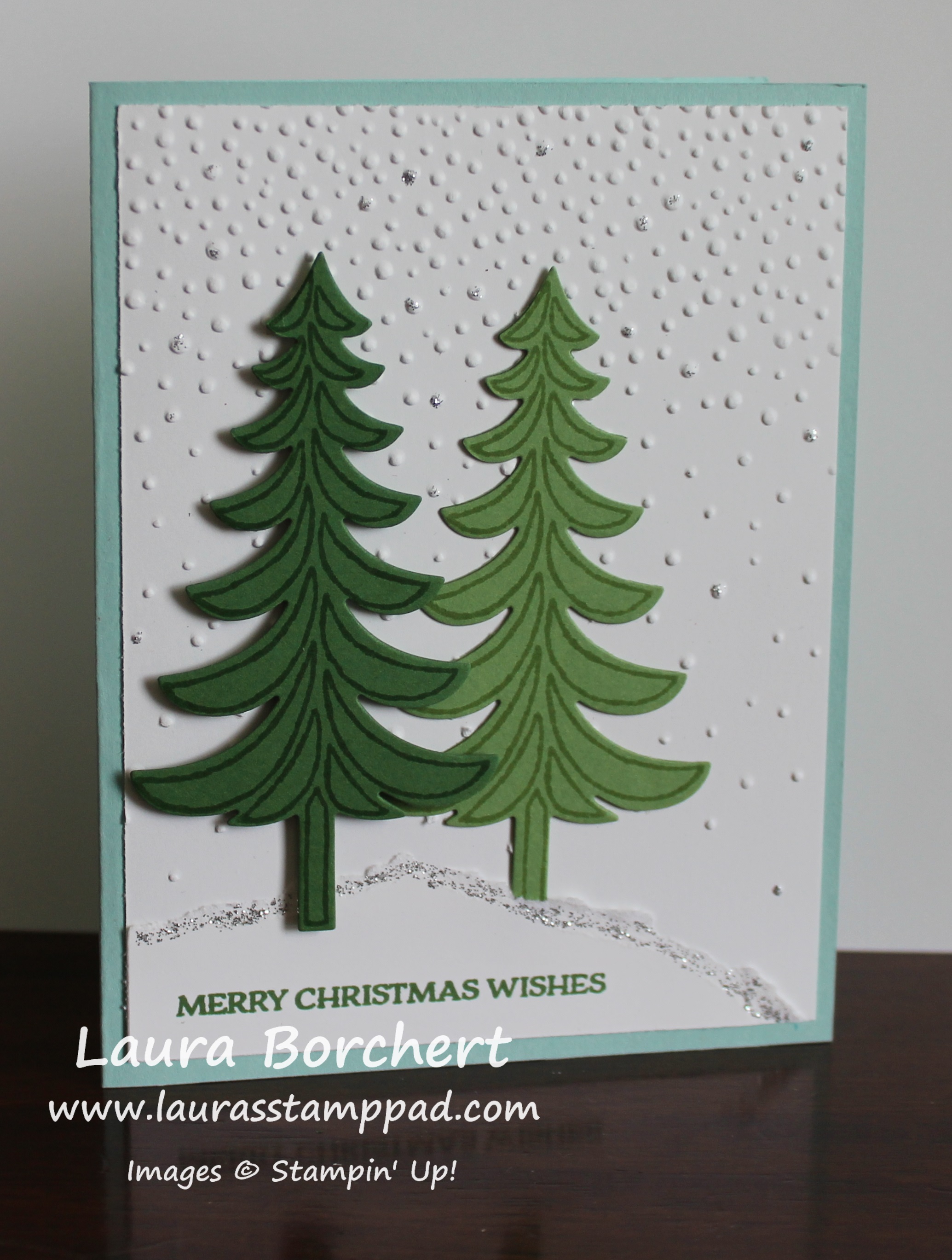
Evergreen Trees in Snow, www.LaurasStampPad.comI just love this card for the simple trees, the textured background, and the pop of glittery snow!!!! This card is perfect for Christmas but also for any winter occasion as well. Also, I would say it is fairly simple although it does need some drying time for the glitter! Let’s get started!!!

I started with a Pool Party card base and then took a piece of Whisper White (4″ x 5-1/4″) and ran it through the Big Shot in the Softly Falling Embossing Folder. There are technically 2 ways you could do this card – concentration of dots on the top or on the bottom. I did mine with the majority of the dots at the top but I also put the cardstock in the folder closest to the fewer dots end. I wanted that gradual look a lot more but you could do it any way you wish!!! I added this piece to the card base! For the trees, I stamped them from the Santa’s Sleigh Stamp Set in Garden Green and Wild Wasabi onto the same cardstock color. Then I used the coordinating Santa’s Sleigh Thinlits (Bundle & Save 10%) to die cut them out! I added the wasabi tree to the card with Snail Adhesive and I added the garden green one with Stampin’ Dimensionals. Before you place your trees down, we need to make the snow. Take a piece of scrap white cardstock and rip it across the top. You can rip it all bumpy or angled down or just straight across. That is all up to you or just how the paper rips! 🙂 Place this piece onto your card front so you know where to place the wasabi tree. Then stamp the greeting from the Santa’s Sleigh Stamp Set in Garden Green Ink and adhere it to the bottom of your white embossed piece. Now you can place the Garden Green tree on top. I like using the dimensionals to over course give dimension but to also make it look like one tree is set back and the other one is closer. To finish it off and add a little bling, I used Silver Dazzling Details along the top of the ripped cardstock (snow hill) and a few random dots of the embossing. I thought it added a little shine and made the snow look more…..real? Come on your all know how snow can look glittery, right??? I love it!!!

If you would like to see this all in action, check out my Video Tutorial below or click here! Be sure to give it a thumbs up if you liked it and don’t forget to subscribe if you are new! I posted videos every Tuesday and Thursday and sometimes here and there in between! Also, if you have something you would like me to showcase, do a tutorial, or chat about let me know in the comments below! I would love your feedback!!!

Happy Stampin’

~Laura

DSP Sale, www.LaurasStampPad.com

Click here to stock up!!!


Technique Tuesday – Fall Sunrise!!!

Posted on

Happy Tuesday!!! I hope you are all having a wonderful week so far! Today I’m going to brighten it with a fabulous sunrise! Check out this beautiful card!!!

fall-sunrise, www.LaurasStampPad.com

This card gives me all the feels – cool crisp air, dew on the grass, beautiful leaves in every color, cuddling up in a hoodie, and pumpkin pie everything!!! 🙂 Hopefully you too! Let’s get started!

I started with a Crumb Cake card base and layered on a piece of Cajun Craze (5-1/2″ x 2″). The Petals & Paisley Designer Series Paper has the perfect fall colors and patterns for any project! I layered a piece of that over the Cajun Craze. It measures 5-1/4″ x 1-3/4″). I stamped the greeting from the Garden in Bloom Stamp Set in the upper left corner in Chocolate Chip Ink. Now it is time to work on the focal point. I took a piece of Very Vanilla cardstock (2-1/4″ x 3″) and started by stamping the grass along the bottom. I used the Totally Trees Stamp Set from the Holiday Mini Catalog. The long snake like image was inked in Garden Green, stamped off once and stamped on the bottom of the vanilla cardstock. I did it three times. Then I took the small circle and the sun rays and stamped them in Crushed Curry. Make sure to place a little piece of paper along the green grass to mask the bottom of the circle so it doesn’t stamp onto the grass and instead look like it’s coming up over the horizon. For the tree, I stamped it in Chocolate Chip Ink. Then I took the leaves and stamped them once in Crushed Curry and then again a little off set in Cajun Craze. You could also ink up the leaves in Crushed Curry and then use a Sponge Dauber to add a little Cajun Craze in a few spots. This gives that beautiful array of fall colors to the leaves! I layered this piece onto Garden Green cardstock (2-1/2″ x 3-1/4″) and added it to the card front with Stampin’ Dimensionals. Isn’t it stunning for all of your fall occasions!?!?!

If you would like to see this all in action, check out the Video Tutorial below or click here! Be sure to give it a thumbs up if you liked it and don’t forget to subscribe if you are new! The Totally Trees Stamp Set is lots of fun for all seasons and occasions but also you can use the images to create fun backgrounds!

Happy Stampin’

~Laura


Technique Tuesday – Z Fold Frenzy!!!

Posted on

Happy Tuesday!!! Can you believe it? The last Tuesday of September is here already but that also means I have a fabulous technique to share with you today. This one is super fun with a very high wow factor and it is super simple!!! Today I am showing the simple Z Fold Card and tomorrow I will be showing the Double Z fold card!!!

Single Z Fold, www.LaurasStampPad.com

Perfect for Fall and super fun!!! Let’s get started!

I started with a Crumb Cake card base measuring 11″ x 4-1/4″ and scored it at 2-3/4″ and 5-1/2″. These are the measurements of folding the card base in half for a normal card and then folding the front of the card back (in half) to create the “Z”. Now it is time to decorate. The front panel has a layer of Cajun Craze cardstock measuring 2-1/2″ x 4″ and Very Vanilla measuring 2-1/4″ x 3-3/4″.

Totally Trees, www.LaurasStampPad.com

The inside panel has a layer of Cajun Craze cardstock measuring 5-1/4″ x 4″ and Very Vanilla measuring 5″ x 3-3/4″. I stamped with the Totally Tree Stamp Set from the Holiday Mini Catalog. For the grass, I stamped the snake looking image in Garden Green (stamped off once) and went 3 layers high. For the inside panel, you will need to stamp the majority on the left and then just fill in on the right. Overlapping is fine because it just adds more color variation. Once you have your base green, take the grass stamp and stamp in full strength Garden Green Ink all over to fill in. This gives great texture to the yard. I stamped the trees in Crumb Cake Ink. Then for the leaves, I took the full tree leaf image and inked it up in Delightful Dijon and then pounced on the stamp with a Cajun Craze Sponge Dauber. Just pounce in 3-4 spots on the stamp and then stamp it down over the trees. This will give that variation of color for the leaves without having to stamp a few times. After stamping the base leaves, I took the small 4 leaf stamp and added in leaves falling and on the ground in Delightful Dijon, Cajun Craze, and Cherry Cobbler. The greeting is from the Tin of Cards Stamp Set and I stamped it in Delightful Dijon Ink. Now you have a fabulous fall card for any occasion!

Fall Leaves, www.LaurasStampPad.com

If you would like to see the Z Fold and Double Z Fold in action, check out the Video Tutorial below or click here. Don’t forget to give it a thumbs up if you liked it and be sure to subscribe if you are new. Subscribe to my blog here as well so you don’t miss the Double Z Fold card tomorrow!

Happy Stampin’

~Laura