Technique Tuesday – Santa’s Reindeer!!!

Posted on

Happy Tuesday!!! Are you ready for this amazing masterpiece??? I have to say this is probably THE MOST amazing, detailed, stunning card I have ever made in my 12+ years of stamping. Check it out!!!

Double Z Fold Sleigh, www.LaurasStampPad.com

There are just no words for this card. I honestly don’t think I am going to send it out. I’m going to save it and display it every year ever so proudly. I just love it so much!!! Now let’s get started on how to make it with the Santa’s Sleigh Bundle (Save 10%)!!!

I started with a Night of Navy card base measuring 11″ x 4-1/4″ and a strip of Whisper White measuring 11″ x 1″. Both of these are scored at 2-3/4″ and 5-1/2″ which creates the Z folds! For the panels, I cut Soft Sky cardstock into the following measurements – 4″ x 5-1/4″ and two pieces of 4″ x 2-1/2″. Then I cut Whisper White to layer on top measuring 3-3/4″ x 5″ and two pieces of 3-3/4″ x 2-1/4″. Go ahead and layer the white onto the Soft Sky and then onto the card base. You can stamp the greeting in the upper right corner. I used the one from the Santa’s Sleigh Stamp Set!

Reindeer Sleigh, www.LaurasStampPad.com

Now you can add the Whisper White strip to the bottom of the card. I lined it up with the bottom of the white on the panels. Be sure that you are only adding adhesive to the small flap and half of the long flap. I like to fold it all up and then add the adhesive to the spots showing (see video below). Place it on the card and then you can work on all of the decorations. I added the trees first. I stamped 2 blue trees using the Santa’s Sleigh Stamp Set and die cut them out with the Santa’s Sleigh Framelits (Bundle & Save 10%). I also cut out a tree in Silver Foil Paper! I added two trees to the large panel and one to the middle small panel. Next up are the reindeer. I stamped all of them in Chocolate Chip Ink onto Crumb Cake cardstock. You will need 6 reindeer. I die cut them out. I also die cut the sleigh in Night of Navy, the sleigh overlay in Silver Glimmer Paper, 12 stars in Silver Glimmer Paper (one for each reindeer and a few others to decorate, and a few bows for the presents in Silver Glimmer Paper!

Santa's Reindeer, www.LaurasStampPad.com

Now to assemble the second Z with the Whisper White strip! All you need to do is take a strip of white scored cardstock and add it to your card opposite folds as the base. Fold it like a Z and the long panel will go across the front (sticking to the left side) and the short panel will adhere to the back right hand side. I used Fast Fuse Adhesive for a strong hold and placed it on the bottom lined up with the bottom of the white panel. I added 2 reindeer to each of the little panels of the white Z fold overlapping them just a little. Be sure that when you add adhesive to the reindeer that you are only adding it on the legs so that adhesive isn’t showing and then glues your card together.

Presents in the Sleigh, www.LaurasStampPad.com

Before placing the last reindeer on, I added the sleigh to the card. I placed the Silver Glimmer overlap onto the navy sleigh with Fine Tip Glue Pen and then added it to the far left of the card. I did trim off a little bit of the sleigh on the bottom rung. Once the sleigh is in place, you can add that final reindeer. Now is also when you will add all of your presents. I stamped the 3 different styles of presents from the Santa’s Sleigh Stamp Set onto Night of Navy and Soft Sky cardstock and cut them out. They are super easy to cut since they are rectangles! Place as many presents as you wish in the sleigh. Then I added the ribbons and all of the Silver Glimmer stars to the card with the Fine Tip Glue Pen. For the reins, I added some of the glue from the Fine Tip Glue Pen to the first reindeer, placed the Whisper White Baker’s Twine down and then added a star. Press and hold for a few seconds and then move to the next one. You could also use a Mini Glue Dot for this part if you wish. Be sure to leave some slack between each reindeer so it doesn’t pull tight when you open the card and so it swags just a bit. I glued the end of the reins under the front of the sleigh at the end. Now you are all set! The most amazing card ever! Yes it is a bit time consuming but it is just so stunning!!! I can’t wait to display mine…..I don’t think I can part with it and send it out.

If you would like to see that all in action, check out my Video Tutorial below or click here! Don’t forget to give it a thumbs up if you liked it and be sure to subscribe if you are new!!!

Happy Stampin’

~Laura

Don’t forget about the Online Extravaganza going on all week long!!! Great chance to get fabulous product on super sale!! Click here to check it out!


Making Spirits Bright!!!

Posted on

Happy Monday everyone!!! I just wanted to give a big Thank You to all of those that participated in the Big Shot Giveaway that I had. I drew the name of the winner on Friday and it was…….drum roll………Gloria C. I’m so excited for her and wish I could have given you all a Big Shot! I had a lot of fun with this so stay tuned as I’m thinking I will do more fun giveaways like these. I’m thinking maybe an entire color family of ink pads (10 pads) next time…what do you think? Let me know in the comments below what you would like!!! making-spirits-bright, www.LaurasStampPad.com

Well Fall/Winter has officially set in here in Illinois. We had one day last week where it was almost 80 degrees and I was in love!!! It felt like Spring again…..and then I got bit by a mosquito and decided FINE bring on Fall! Then 5 hours later, it was!!! Brrr. It’s cold out, the leaves are blowing and I’m ready for Thanksgiving! Can’t believe that’s next week! I’m so excited! I LOVE Thanksgiving!!! Today I’m going to skip Thanksgiving and help you get ready for the next holiday as this card is one in my Cut For Christmas offer! I do all of the cutting, provide instructions, and a color photo and all you have to do is stamp and assemble!!! Quick and easy!

I started with a Crumb Cake card base. Then I adhered four strips of Candy Cane Lane Designer Series Paper measuring 1″ x 2-3/4″ onto a piece of Real Red cardstock (4-1/2″ x 3-1/4″). The fun thing about this is that the Designer Series Paper is 2-sided so you have endless options on your strips. You can work with 2 prints or 4 prints in any combination! You also don’t have to worry about using up only certain styles in your Designer Series Paper Pack. Love it!!! Then I wrapped some Candy Cane Lane Baker’s Twine around the Real Red rectangle. You can do this in the middle and tie a bow or in an “X” pattern like mine. I actually put the knot on the back side because I didn’t want it to show. Then I added this piece to the card front with Stampin’ Dimensionals. I used those because I love them so much and so the cardstock lays flat and isn’t bumpy over the Baker’s Twine. For the greeting, I stamped the snowflake from the Tin of Tags Stamp Set in Crumb Cake Ink. I stamped off once before stamping on the Whisper White for a lighter look so that the greeting still pops! Then I stamped the greeting from the Tin of Tags in Real Red Ink over the top of the snowflake. I die cut out the scallop circle with the Layering Circles Framelits. I love these things because they layer so well and add the perfect took to any project!!! I die cut out a smooth circle in Early Espresso and layered the two together. I added the greeting to the card front using Stampin’ Dimensionals. Again, I used Stampin’ Dimensionals because I love them so much and so that it looks smooth over the Baker’s Twine.

I love this card for the amazing greeting and cheerful look! I got the idea for this card from fellow stamper, Ann Veneziano that I did a card swap with!!! I love sharing ideas with other stampers!! It’s so much fun!

Don’t forget about the Online Extravaganza that started today!!! Fabulous Door Busters today and next Monday! Also, the Tin of Tags Stamp Set I used on this card is on sale this month too! I love that set for greetings!!

Happy Stampin’

~Laura


Gold Ornaments!!!

Posted on

golden-ornament, www.LaurasStampPad.com

Happy Thursday!!! We are almost to the weekend and I’m sharing a fabulous card with you today that I thought wasn’t going to finished. Once I did finish it, it turned into this amazing card that I thought “WOW, I love that and think I will use it in a class!” Do you ever have one of those moments while crafting that something doesn’t turn out like you wanted or you get started but then take it a different direction and toss what you were doing aside? That is what happened here. I die cut the gold ornament and had some other designer paper ready but didn’t like the look. I tossed it aside but at the end of the day, I thought just finish this card and use it personally…..and then this happened! I LOVE IT!!!

I started with a Whisper White card base measuring 4-1/4″ x 11″. Then I took a piece of Cherry Cobbler (4″ x 5-1/4″) and layered some of the Presents and Pinecones Designer Series Paper (3-3/4″ x 5″) on top. This wasn’t my favorite paper at first glance but I have been using it a lot this season. You can see more samples using it here and here! I die cut the ornament out with the Merry Tags Framelits in Gold Foil Paper. You should totally go for it and get the Merriest Wishes Stamp Set so you can Bundle & Save 10%. I have loved using this stamp set and you can always use one of the greeting on the inside of this card! After die cutting out the ornament, I placed an Emerald Envy Circle on the back that I punched out with the 1-3/4″ Circle Punch. Then I slide a piece of the Emerald Envy Silky Taffeta Ribbon through the ornament top and placed a Stampin’ Dimensional on the back to hold the end of the ribbon and to adhere to the card front. Add a few more dimensionals and then place the ornament on the card with the other end of the ribbon going over the top of the Cherry Cobbler and secured to the back. Once the ribbon is secured, you can add this to your card base. To finish it off, I tied a bow with some more of the Emerald Envy Silky Taffeta Ribbon and secured it to the top of the ornament with some Mini Glue Dots! Now you are all done! You can add a greeting of your choice to the inside if you wish! I just love the colors and that gold shine and silky ribbon!

If you would like to see this all in action, check out my Video Tutorial below or click here. Be sure to give it a thumbs up if you liked it and don’t forget to subscribe if you are new! I post every Tuesday and Thursday!!

Are you done with your Christmas or Holiday card yet? Have you started on them? Let me know in the comments below! I have my envelopes stamped with my return address and a postage stamp on them. I have a few more classes that I need the samples for and then I will start writing them out, making more, and stuffing them in the envelopes. I like to have them done by the end of November and ready to mail out in early December!

Happy Stampin’

~Laura

TODAY IS THE LAST DAY to enter the Big Shot Giveaway! I will be drawing the winner of the Big Shot tomorrow at 1:00 p.m. Central Time on a Facebook Live Video. Click here to join my Facebook Page!

Big Shot Code:HSQJBEPD, www.LaurasStampPad.com


Christmas Morning!!!

Posted on

tree-with-presents, www.LaurasStampPad.com

This card looks just like Christmas morning! Coming down the stairs and peaking into the living room to see the tree all lit up and all the presents underneth the tree! It’s just so magical!!! I’m loving the Santa’s Sleigh Bundle (Save 10%) which is how I created this card!

For this card, I started with a Real Red card base. Then I took a piece of Whisper White measuring 4″ x 5-1/4″ and I stamped the tree from the Santa’s Sleigh Stamp Set in Garden Green Ink and the 3 different styles of presents in Real Red Ink. Then I stamped the bows onto a scrap piece of Whisper White and then die cut them out with the Santa’s Sleigh Framelits. I die cut a star from the same Framelit set in Crushed Curry paper. I added the star and bows to the card front with Stampin’ Dimensionals to give a little texture to the scene! Since these are so small, this is where you will want to cut the outside edge of the dimensionals into small pieces. I wanted a little bit more of a fancy greeting than those that are in the Santa’s Sleigh Stamp Set so I pulled out the Hang Your Stocking Stamp Set. I stamped the greeting in Basic Black. I wrapped some Basic Black Baker’s Twine around the top and tied it into a bow and then added it onto the card base with Stampin’ Dimensionals. When I have ribbon around the cardstock then I like to adhere it with dimensionals because then it looks smooth and not lumpy! And there is your Christmas morning….just like that!!!!

You can check out some of there samples using the Santa’s Sleigh Bundle right here and stay tuned for another super amazing one I will be posting soon! The one coming soon is THE best….most detailed……AMAZING card I have made in my 12+ years stamping! Be sure to subscribe so you don’t miss out!

Happy Stampin’

~Laura

Tomorrow is the last day to enter the Big Shot Giveaway!!! I can’t wait till Friday to draw a name for this fabulous crafting tool! Will your name be in the drawing??? Click here for all the details!!

bigshotgiveaway, www.LaurasStampPad.com


Holly Berries!!!

Posted on

Stepped Up Holly Card, www.LaurasStampPad.com

Traditional red and green feels like Christmas….even though I really enjoy branching out with other colors. For this holly card, of course it had to be traditional colors! I love how the leaves and berries are separate and photopolymer so you can ink it up in the correct color and see where you are stamping!!! I created a simple version and stepped-up version of this card! Let me know in the comments which one you prefer!

I started with a Cucumber Crush card base. Then I took a piece of Whisper White (3-3/4″ x 5″) and stamped the holly all over. I used the Hang Your Stocking Stamp Set and stamped the leaves in Cucumber Crush Ink and the berries in Real Red Ink. Be sure that you stamp all the way to the edge and even falling off of the cardstock so that it looks like the pattern continues on. Next, I adhered the stamped white piece to Real Red cardstock (4” x 5-1/4”). Then I wrapped some Candy Cane Lane Baker’s Twine around these pieces and tied it into a bow but you could do a knot whichever you prefer. Now you can add this to the card base with Stampin’ Dimensionals. I like to raise the image up with dimensionals so that it looks smooth with the twine behind it and holds tight. For the greeting, I stamped it from the Hang Your Stocking Stamp Set in Real Red Ink onto Whisper White. I die cut it out with the Tags & Labels Framelits. I die cut a label to layer it on in Silver Foil Paper. I love how these framelits layer so perfectly!  I adhered the stamped label to the Silver Foil label and attached the greeting to the card front with Stampin’ Dimensionals. Again I use them to pop up the greeting so it looks smooth over the twine. I love the little shine of the twine and foil with the simple look of holly berries!

holly berries, www.LaurasStampPad.com

Here I did a simple version of the same card! I went with one layer of cardstock and left off the ribbon! I started off with this one but then got the idea to step it up! Which do you prefer?? Let me know in the comments below!

Your Pick, www.LaurasStampPad.com

The stepped up card is one of the samples in my Cut For Christmas offer so if you love it and would like to make them, sign up today!!! You can check out the other cards in the offer by checking out the Video Tutorial below or click here. Don’t forget to give the video a thumbs up if you liked it and be sure to subscribe if you are new!

Happy Stampin’

~Laura

Big Shot Code:HSQJBEPD, www.LaurasStampPad.com

Die cutting eliminates fussy cutting which makes crafting much faster!!! Check out my Big Shot Giveaway where you can win one of your own! Click here for more information!


Technique Tuesday – Santa’s Sleigh!!!

Posted on

Happy Tuesday!!! That means I have a fabulous technique to share with you today!!! Sometimes it’s the little things that make the biggest impact and that’s how I feel about this card today!!! But if you like an even bigger impact…..stay tuned….I have something for you too! Sneak peak below!

christmas-blessing, www.LaurasStampPad.com

Simplistic and yet stunning!!! The Santa’s Sleigh Bundle (Save 10%) has simple images that can be used in so many different ways alone but also can create the most beautiful masterpiece when paired together!

For this card, I started with a Whisper White card base. Then I took another piece of Whisper White (3-3/4″ x 5″) and stamped the label from the Christmas Pinecones Stamp Set in VersaMark Ink. I added Silver Embossing Powder and heated it with the Heat Tool! I really wanted the greeting to shine and look a little more fancy to match the fabulous sleigh! Check out more on heat embossing here! Then I stamped the greeting from the Christmas Pinecones Stamp Set in Night of Navy in the center of the label. Now for the sleigh, I die cut the main piece in Night of Navy with the Santa’s Sleigh Thinlits. I used the Precision Base Plate with the Big Shot so each of those intricate pieces would be cut perfectly! Then after running it through, I used the Big Shot Die Brush to pop it out of the die and pop out all of those little pieces so easily! Those are my 2 favorite tools for the Big Shot!!! Love!!! For the overlay on the sleigh, I used Silver Foil Paper to die cut it out!

santas-sleigh, www.LaurasStampPad.com

The overlay lines up so perfectly over the top of the sleigh and I used the Fine Tip Glue Pen to adhere them together. You just need a little bit of glue so I add it on the edges and in the larger sections in the middle. Just a light little bit so it doesn’t squeeze out onto your project! I used that same glue to adhere the sleigh to the card front. Once you have added the glue, place it on your project and lay your hand over the top, pressing firmly. Hold for about 15 seconds and to allow the glue to take hold and then you are golden! If you see a few spot pop up, just carefully place the tip of the glue underneath to add a smidge more!! Once I have the sleigh on, I layered this piece onto Night of Navy cardstock (4″ x 5-1/4″). Then I layered it onto the card base with Stampin’ Dimensionals to give it some dimension.

glimmer-sleigh, www.LaurasStampPad.com

You can also do it in Silver Glimmer Paper or even Gold or Red!! So many fun ways to create with the Santa’s Sleigh Thinlits. If you would like to see this in action and more on the Santa’s Sleigh Bundle, check out the Video Tutorial below or click here! Don’t forget to give it a thumbs up if you liked it and be sure to subscribe if you are new!!!

Now for the sneak peak……

all-the-presents, www.laurasStampPad.com

Happy Stampin’

~Laura

Seasonal Offer, www.LaurasStampPad.com

Check out my Cut For Christmas Offer this season! The perfect holiday helper during this busy time of the year!!!


Peace & Happiness!!!

Posted on

Peace & Happiness, www.LaurasStampPad.com

Simple and fabulous! I have never been a fan of Delightful Dijon until the Petals & Paisleys Suite came out. Then I was like “oh this color is fabulous!”. Now I pulled it out for this holiday card and love how it has that golden look without using Gold Foil Paper or Gold Glimmer Paper. This card is simple and yet perfect!!!

I started with a Night of Navy card base! I added a strip of Presents & Pinecones Designer Series Paper to the center. For the greeting, I used the Stars Framelits for the various sizes. I tried out a few different ways before settling on this design. You can layer the stars on top of each other with a nice border around the greeting or even add various sizes diagonally from corner to corner. I stamped the greeting in Night of Navy Ink from the Stitched With Cheer Stamp Set from the Holiday Mini Catalog. You can always base the size of your star on the size of your greeting. I added the Delightful Dijon Star to the card with Snail Adhesive and the white greeting star with Stampin’ Dimensionals.

Have you planned out your Christmas Cards yet? Let me know what set you are using for yous! I would love to hear from you in the comments below!!!

Happy Stampin’

~Laura

Seasonal Offer, www.LaurasStampPad.com

Check out this fabulous offer for the Holiday Season!!!


Technique Tuesday – Shaker Cards!!!

Posted on

Happy Tuesday!!! I hope you are having an amazing week so far. If not, I hope this super fun card will make it better. Shaker cards are so much fun and sure to brighten anyone’s day!!!

Fishy Shaker Card, www.LaurasStampPad.com

Aren’t the little fish adorable?? When you add in the little blue “beads” that shake all over it’s even better!!!! Thank you to Rachel Chamberlain for the fun idea of coloring Silica Gel to add to your shaker cards! Now let’s get started!

SUPPLIES NEEDED: Jar of Love Stamp Set, Everday Jars Framelits, Re-Inker, Silica Gel, Adhesive Foam Strips, Window Sheets

I started with a Pool Party card base. Then I took a piece of Whisper White measuring 4″ x 5-1/4″ and stamped the largest jar from the Jar of Love Stamp Set in Basic Black Ink. Then I die cut out the center of the jar with the “soda can” looking image from the Everyday Jars Framelits (Bundle & Save 10%). Then stamp your greeting on the bottom of the cardstock below the jar. I used the greeting from the Party Wishes Stamp Set. Now you will place this white cardstock onto your card base in the center, set the die cut piece back in the open hole and hold it in place. While holding the die cut piece in place, remove the outside piece (the one with the jar and greeting on it). Now you will need to trace around the “soda can” piece in that exact spot. This is to ensure perfect placement of the shaker pieces. If you added everything to the back of the white cardstock, then it would be difficult to line up the card base and you can flip over the white piece once you have added your shaker items. Now that you have your template on the card base, place the Adhesive Foam Strip around the image over your pencil template. Now you can fill the area with your shaker goodies. For the sample shown, I added some fish from the Jar of Love Stamp Set which were stamped in Tangerine Tango and die cut out with the framelits. I also added some Silica Gel beads. These are the little packets that come in show boxes and purses that say “Do Not Eat” on the packet. I placed a few of them into a dish and added a drop of Bermuda Bay Re-inker to color them. Allow them to dry before adding them to your project. I usually put them by the vent or in front of a fan. Once they are ready you can pour some into the open area. For the top piece, you will need to place a piece of Window Sheet over the open jar cut out on the back side of the Whisper White cardstock. Now it is time to place it over your card base. I then added some Bermuda Bay Baker’s Twine around the top and placed a Stampin’ Dimensional on each of the 4 corners to secure them down. You can always add the dimensionals before placing it down but I like to do it after so I don’t have so many sticky pieces when working on the perfect placement. 🙂 How fun is that???

Jar of Fishy, www.LaurasStampPad.com

If you would like to see this all in action, check out the Video Tutorial below or click here. Be sure to give it a thumbs up if you liked it and don’t forget to subscribe if you are new!!!

Happy Stampin’

~Laura

Seasonal Offer, www.LaurasStampPad.com

Check out this fabulous offer for the Holiday Season!!!


Technique Tuesday – Creating a Snowy Scene!!!

Posted on

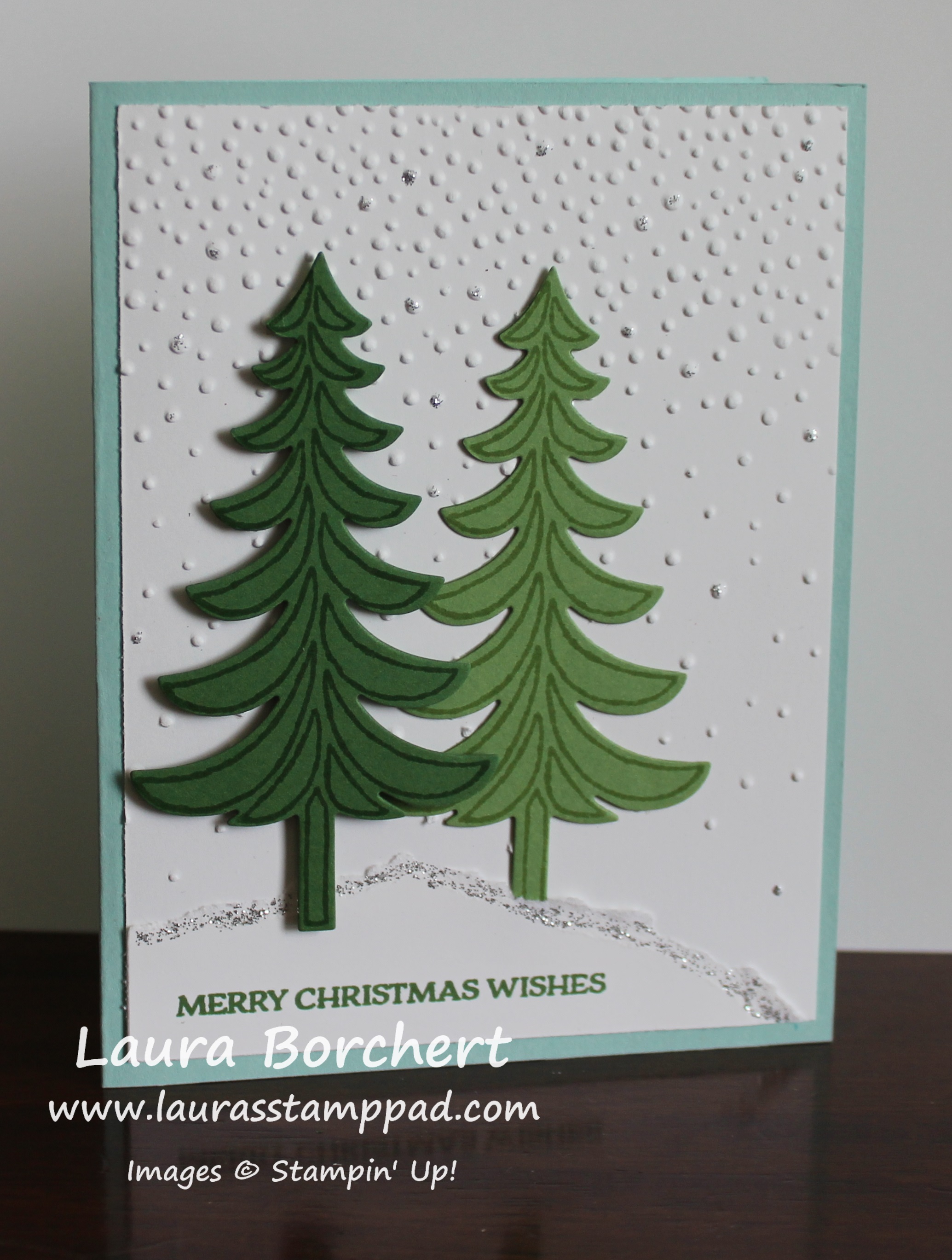
Happy Tuesday everyone!!! That means I have a fabulous technique to share with you all!!! DISCLAIMER: I don’t mind stamping/creating a snowy scene but let’s not make it happen in real life for a few months….or never would be fine! 🙂

Evergreen Trees in Snow, www.LaurasStampPad.comI just love this card for the simple trees, the textured background, and the pop of glittery snow!!!! This card is perfect for Christmas but also for any winter occasion as well. Also, I would say it is fairly simple although it does need some drying time for the glitter! Let’s get started!!!

I started with a Pool Party card base and then took a piece of Whisper White (4″ x 5-1/4″) and ran it through the Big Shot in the Softly Falling Embossing Folder. There are technically 2 ways you could do this card – concentration of dots on the top or on the bottom. I did mine with the majority of the dots at the top but I also put the cardstock in the folder closest to the fewer dots end. I wanted that gradual look a lot more but you could do it any way you wish!!! I added this piece to the card base! For the trees, I stamped them from the Santa’s Sleigh Stamp Set in Garden Green and Wild Wasabi onto the same cardstock color. Then I used the coordinating Santa’s Sleigh Thinlits (Bundle & Save 10%) to die cut them out! I added the wasabi tree to the card with Snail Adhesive and I added the garden green one with Stampin’ Dimensionals. Before you place your trees down, we need to make the snow. Take a piece of scrap white cardstock and rip it across the top. You can rip it all bumpy or angled down or just straight across. That is all up to you or just how the paper rips! 🙂 Place this piece onto your card front so you know where to place the wasabi tree. Then stamp the greeting from the Santa’s Sleigh Stamp Set in Garden Green Ink and adhere it to the bottom of your white embossed piece. Now you can place the Garden Green tree on top. I like using the dimensionals to over course give dimension but to also make it look like one tree is set back and the other one is closer. To finish it off and add a little bling, I used Silver Dazzling Details along the top of the ripped cardstock (snow hill) and a few random dots of the embossing. I thought it added a little shine and made the snow look more…..real? Come on your all know how snow can look glittery, right??? I love it!!!

If you would like to see this all in action, check out my Video Tutorial below or click here! Be sure to give it a thumbs up if you liked it and don’t forget to subscribe if you are new! I posted videos every Tuesday and Thursday and sometimes here and there in between! Also, if you have something you would like me to showcase, do a tutorial, or chat about let me know in the comments below! I would love your feedback!!!

Happy Stampin’

~Laura

DSP Sale, www.LaurasStampPad.com

Click here to stock up!!!


Swirly Scribble Pumpkins!!!

Posted on

happy-day-pumpkins, www.LaurasStampPad.com

Fall is in the air! The breeze is cool, the evenings are darker, and the leaves are falling! This means that it is time for PUMPKIN EVERYTHING…..including greeting cards! I was sooooo excited with myself when I first got the Swirly Scribbles Framelits and I die cut one out. I immediately saw a pumpkin in the swirl and thought how fabulous, I can’t wait to make pumpkin cards! Of course a few weeks later I saw that others had figured it out as well! Isn’t it beautiful?!?!?

I started with a Crumb Cake card base and layered on a piece of Whisper White measuring 4″ x 5-1/4″. I die cut the pumpkins in Pumpkin Pie cardstock with the Swirly Scribbles Framelits. I die cut 2 small ones and 1 large one. The leaves were die cut with the same set in Garden Green cardstock. Thank goodness for the Fine Tip Glue Pen for adhering the pumpkins to the card front! The second small swirly is in the middle of the large one. You could always leave the center of the pumpkin open. You can add as many leaves as you wish. The greeting was stamped from the Perfectly Wrapped Stamp Set in Crumb Cake Ink. I finished off the card with a little bit of Linen Thread wrapped around the card base. This is the perfect fall card for any fall parties, birthdays, and other events during the season.

You could also create other round fruit with the Swirly Scribbles Framelits like apples, cherries, or even tomatoes. If you would like to see all of this in action, check out the Video Tutorial below or click here. Be sure to give it a thumbs up if you liked it and don’t forget to subscribe if you are new!!!

Happy Stampin’

~Laura